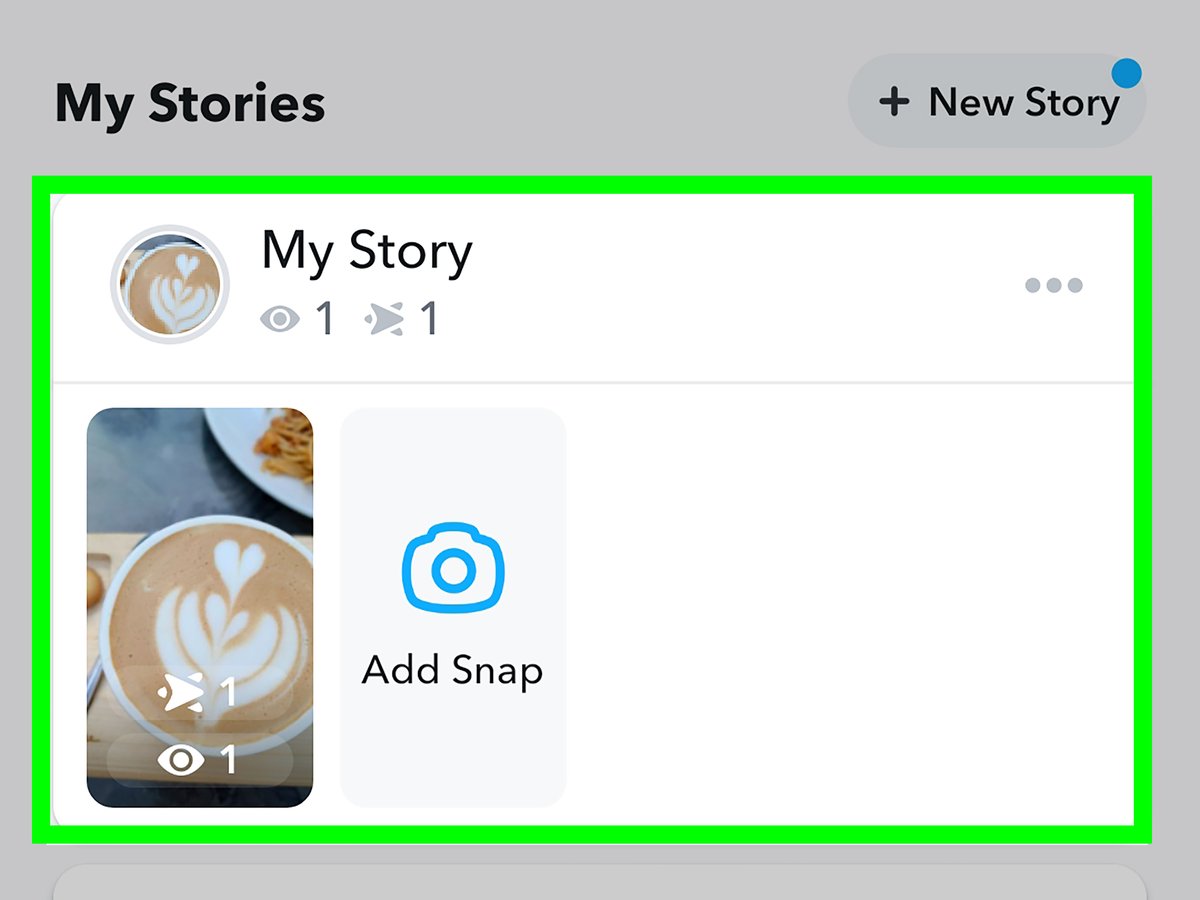
Wondering if that funny snap you posted is being secretly screenshotted? The question of "does Snapchat tell you when someone screenshots your story?" is a crucial one when considering online privacy and how your content is shared. Knowing when someone captures your content without your direct knowledge is key to managing your digital footprint.
At a glance:
- Find out exactly when and how Snapchat notifies you about screenshots taken of your story.
- Explore the workarounds people use to screenshot without detection, and their potential downsides.
- Understand the ethical considerations involved in taking screenshots without consent.
- Get a practical guide to respecting privacy while using Snapchat.
- Learn how to protect your own content from unwanted screenshots.
Snapchat's Screenshot Notification System: How It Works
Snapchat is designed to notify you when someone screenshots your snaps, chats, or stories. This is intended to promote user privacy and awareness. When someone takes a screenshot, a double-arrow icon appears next to their name in your chat feed. You'll also receive a direct notification that "User has taken a screenshot." It's a pretty straightforward, built-in system. This notification can't be turned off within the app, making it a default feature for all users.
This instant feedback loop allows senders to be immediately aware of any saved content, encouraging more mindful sharing. Think of it as a digital tap on the shoulder—a polite (but sometimes unwelcome) reminder that your content isn't as ephemeral as you might have thought.
Bypassing the System: Methods to Screenshot Without Detection
Despite Snapchat's efforts, several workarounds exist to screenshot content without notifying the sender. Keep in mind that using these methods might violate Snapchat's terms of service and, more importantly, raises ethical considerations.
- The Second Device Hack: This is the simplest method. Just use another phone or camera to take a picture or video of the snap on the original device. Old school, but effective.
- Screen Mirroring: Project your phone screen onto a computer (Windows or Mac) and capture the content from there. For example:
- Windows: Use the "Projecting to this PC" feature.
- iPhone: Utilize the built-in screen-sharing capabilities.
- Mac: Use QuickTime Player for screen recording.
- Screen Recording: Most smartphones have built-in screen recording features. Start recording before opening the snap, and then take a screenshot from the video later.
- Google Assistant (Android): Activate Google Assistant and say, "Take a screenshot." This can sometimes bypass the notification.
- The Airplane Mode Trick (Use with Caution): This involves enabling Airplane Mode before viewing the snap, taking the screenshot, and then force-closing the Snapchat app before disabling Airplane Mode. This method is unreliable and may not always work.
Important Considerations: - Terms of Service: Bypassing screenshot notifications might violate Snapchat's terms.
- Effectiveness: Some methods are less reliable than others due to Snapchat updates.
- Ethical Implications: Taking screenshots without consent raises serious privacy concerns.
Third-Party Apps: A Risky Proposition
Numerous third-party apps claim to allow discreet viewing and saving of Snapchat content. An example being Phonsee, which advertises features like stealth mode, screenshot capture without notification, and activity logs.
Why to be Careful:
- Security Risks: These apps often require you to grant access to your Snapchat account, potentially exposing your personal information.
- Malware: Some apps may contain malware or other malicious software.
- Violation of Terms: Using these apps almost certainly violates Snapchat's terms of service, and could lead to account suspension.
- Efficacy: Many are scams or simply don't work as advertised.
Recommendation: Avoid third-party apps that promise to bypass Snapchat's security features. The risks far outweigh the potential benefits.
Ethical Dilemmas: When is it Okay to Screenshot?
While technical workarounds exist, the ethical considerations of taking screenshots without consent are paramount. Just because you can do something doesn't mean you should.
- Respect Privacy: Imagine someone screenshotted your private snaps without your knowledge. Would you be comfortable with that?
- Consider the Context: Is the content sensitive or personal? Is the person expecting it to disappear?
- Ask for Permission: When in doubt, simply ask if it's okay to take a screenshot. A simple "Hey, is it cool if I screenshot this?" goes a long way.
Scenario: Your friend sends you a funny meme via Snapchat. Is it okay to screenshot it? Most likely, yes. But if your friend sends you something deeply personal and vulnerable, screenshotting it without their permission would be a clear violation of trust.
Protecting Your Own Content: Taking Control of Your Privacy
While you can't completely prevent someone from taking a screenshot of your Snapchat story, you can take steps to minimize the risk and protect your privacy.
- Be Mindful of What You Share: Think twice before posting sensitive or personal information. Remember, anything you share online can potentially be screenshotted and shared further.
- Use Close Friends Feature: Share more personal content only with your close friends, reducing the potential audience.
- Clear Communication: Let your friends know that you prefer they don't screenshot your snaps without asking.
- Watermarks: Consider adding subtle watermarks to your snaps, especially if you're concerned about unauthorized use.
- Review Your Audience: Regularly review who is on your friends list and remove anyone you don't trust.
Practical Playbook: A Quick Guide to Privacy-Conscious Snapping
Here's a straightforward approach in a table:
| Step | Action | Reason |
|---|---|---|
| 1. Content Consideration | Before snapping, ask: "Would I be okay if this was shared beyond the intended recipient(s)?" | Reduces regret and potential privacy breaches. |
| 2. Audience Segmentation | Utilize the "Close Friends" list for more personal content. | Limits exposure to a trusted group. |
| 3. Communication & Boundaries | Inform your friends about your preferences regarding screenshots. | Sets expectations and fosters mutual respect. |
| 4. Monitor & Adjust | Periodically review your friends list and adjust privacy settings. | Maintains control over who sees your content. |
| 5. Respond (If Screenshot Occurs) | If notified of a screenshot, consider a polite inquiry about its purpose. | Demonstrates your awareness and allows for a conversation about privacy. |
Quick Answers: Common Questions About Snapchat Screenshots
Q: Does Snapchat always notify you when someone screenshots a story?
A: Yes, Snapchat's built-in system is designed to notify you. However, as we've discussed, there are workarounds. The effectiveness of these workarounds is always subject to change due to app updates. For more about the fundamental notification setup, Snapchat screenshot notifications explained here.
Q: Can I tell who screenshotted my story if I have a large number of viewers?
A: Yes, Snapchat will show you a list of usernames that screenshotted your story. It's not anonymous.
Q: Is it illegal to screenshot someone's Snapchat without their permission?
A: Illegality depends on the content of the snap and local laws. However, even if it's not illegal, it could violate Snapchat's terms of service and is often unethical.
Q: What if I accidentally took a screenshot?
A: It happens! Acknowledge it and apologize to the sender. Open communication can often resolve any potential issues.
Q: Does Snapchat notify if someone uses a screen recording app?
A: No, generally Snapchat only directly notifies of screenshots, not screen recordings. However, the sender may suspect something if you take an unusually long time to respond while viewing their Snap.
Actionable Close: Take Control of Your Snapchat Experience
Ultimately, responsible Snapchat use involves a combination of awareness, caution, and respect for others' privacy. While technological means can be used to bypass notifications, ethical considerations should always be at the forefront. Protect your own content by being mindful of what you share and communicating your boundaries clearly. By following the tips outlined above, you can enjoy Snapchat while maintaining a safe and respectful environment for yourself and your friends.
