Worried someone will know if you screenshot their WhatsApp status or messages? Understanding how WhatsApp handles screenshots is crucial for navigating privacy on the platform. Unlike some apps, WhatsApp's approach is pretty hands-off... with a few key exceptions.
At a glance:
- WhatsApp does not notify you when someone screenshots your chats, status updates, or profile information (with 1 key exception).
- "View Once" photos and videos are designed to prevent screenshots, and in most cases, it works.
- You can screenshot regular chats freely without the other person knowing.
- Some workarounds exist to bypass the screenshot restrictions, but they often come with trade-offs.
- Respecting privacy is crucial, even if WhatsApp doesn't actively enforce it.
- Consider the sensitivity of the information you're sharing on WhatsApp.
The Blunt Truth: Screenshots on WhatsApp are Undetectable (mostly)
For the vast majority of WhatsApp activity, taking a screenshot is a silent affair. Whether it's a funny meme in a group chat, an important message you want to save, or even someone's profile picture, the other person won't receive a notification that you've captured it. This applies to standard text conversations, media files, and even disappearing messages. The function to snap a screenshot is part of your device's operating system, not WhatsApp's internal features.
However, there’s one major exception: WhatsApp's "View Once" feature.
The "View Once" Exception: Built-in Screenshot Protection
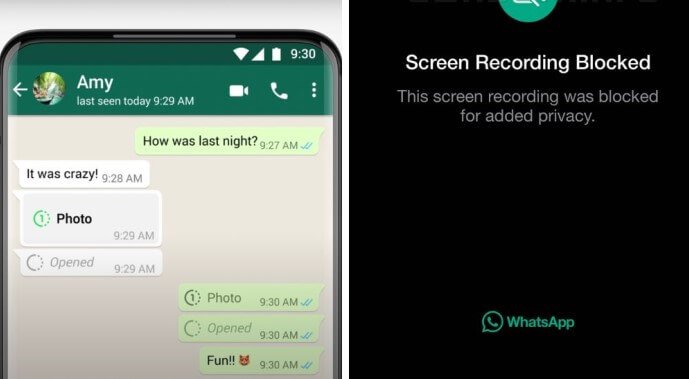
WhatsApp introduced "View Once" media to enhance privacy. When you send a photo or video using this feature, the recipient can only view it once, and then it disappears. Crucially, WhatsApp actively tries to block screenshots of these "View Once" items.
Here's how it typically works:
- Android and iOS: When someone attempts to screenshot a "View Once" photo or video, the screen often turns black or displays an error message, preventing the capture.
This feature provides a degree of control over your shared content. To send a View Once photo or video:
- Open a chat in WhatsApp.
- Tap the camera icon and select the media.
- Tap the "1" icon next to the send button. The icon turning green indicates that the media has been set to "View Once."
- Send the media.
While not foolproof (more on that later), View Once is a valuable tool for sharing sensitive information with limited exposure. Further details about WhatsApp's overall privacy features can be found in this guide: WhatsApp Screenshot Privacy Explained.
Bypassing Screenshot Restrictions: Workarounds and Their Trade-offs
Despite WhatsApp's efforts to block screenshots of "View Once" media, some users seek workarounds to capture this content. It's essential to understand these methods and their limitations.
1. The External Device Method: Low-Tech, But Effective
The simplest method doesn't involve any technical trickery. It simply requires a second device with a camera.
- Open the "View Once" photo or video on the target phone.
- Use a second phone or camera to take a picture of the screen.
- Adjust your angle and lighting to minimize glare and reflections.
Pros: - Simple and requires no technical skills.
- Works on any device.
Cons: - Image quality may be lower than a direct screenshot.
- Requires a second device.
- Not discrete.
2. Screen Mirroring: A Risky Solution
Screen mirroring involves displaying your phone's screen on another device, such as a computer or another phone. While this can be used to bypass screenshot restrictions, it's often unreliable and resource-intensive.
Here's how it works:
- Connect both devices to the same Wi-Fi network.
- Enable a mirroring tool like AirPlay (for iPhone), Miracast (for Android), or a third-party app.
- Open WhatsApp on the mirrored phone screen.
- Capture screenshots or recordings using the secondary device's native features.
Pros:
- Potentially allows for higher-quality captures.
Cons: - Requires a strong and stable Wi-Fi connection.
- Can be laggy or unreliable.
- May not work with all devices.
3. App Cloning: Advanced, but Potentially Unsafe
App cloning involves creating a modified version of WhatsApp that may bypass screenshot restrictions. This method typically requires using a third-party app cloner, such as App Cloner.
- Download and install App Cloner from a reliable source (beware of unofficial sources, which may contain malware).
- Clone WhatsApp using the app and access the customization options.
- Enable screenshot support and disable any "secure flag" options during the cloning setup.
- Install and open the cloned WhatsApp, log in, and attempt to take screenshots.
Pros:
- May allow for direct screenshots of "View Once" media.
Cons: - Requires technical expertise.
- May violate WhatsApp's terms of service.
- Poses security risks if the app cloner is not trustworthy.
4. Alternative Apps like XNSPY: Use with CAUTION
Some monitoring apps, like XNSPY, offer screen recording capabilities that can capture WhatsApp activity, including "View Once" media.
Here’s a step-by-step process on how you can use XNSPY to capture WhatsApp screenshots:
- Purchase a subscription plan from the official XNSPY website.
- Install XNSPY on the target device using the emailed instructions.
- Log in to your XNSPY control panel from any browser.
- Navigate to the “Screen Recorder” or “Screenshots” sections to view WhatsApp activity.
Pros:
- Can record entire screen activity
Cons: - Expensive
- Morally questionable to use without consent
- Can be detected by the other user
Important Ethical Considerations: Using these workarounds to bypass privacy features can be unethical and potentially illegal, depending on the context and jurisdiction. Always respect the privacy of others and obtain consent before capturing their content. Also be aware, installing software on someone's device without their knowledge can have severe repercussions.
Why Doesn't WhatsApp Notify Screenshots?
WhatsApp's design choices reflect a balance between privacy and usability. Here's why they likely don't notify users of screenshots:
- Technical Complexity: Implementing reliable screenshot detection across all devices and operating systems would be challenging and resource-intensive.
- User Experience: Constant screenshot notifications could be annoying and disruptive, leading to a negative user experience.
- Philosophical Stance: WhatsApp likely believes that users should be responsible for the content they share and trust the people they're communicating with.
Practical Playbook: Safeguarding Your WhatsApp Privacy
While you can't prevent others from screenshotting your messages (excluding "View Once"), you can take steps to protect your privacy:
- Think Before You Send: Before sharing sensitive information on WhatsApp, consider the potential consequences if it were to be screenshotted and shared without your permission.
- Use "View Once" Wisely: Utilize the "View Once" feature for photos and videos that you want to share temporarily and prevent from being saved.
- Adjust Your Privacy Settings: Control who can see your profile picture, status updates, and "About" information in WhatsApp's privacy settings. To do this, go to Settings > Privacy.
- Enable Disappearing Messages: Set messages to disappear after a set period (24 hours, 7 days, or 90 days) to limit the lifespan of your conversations. Activate by selecting a contact, tapping their name at the top, and selecting Disappearing Messages.
- Communicate with Trusted Contacts: Only share sensitive information with people you trust and who you know will respect your privacy.
- Avoid Sharing Personal Information: Refrain from sharing sensitive data such as ID cards, financial details, or medical records on WhatsApp.
- Be Aware of Your Surroundings: When using WhatsApp in public places, be mindful of who might be looking at your screen.
Quick Answers: Common Questions About WhatsApp Screenshots
- Does WhatsApp notify screenshots of status updates? No, taking a screenshot of someone's WhatsApp status won't trigger any notification.
- Does WhatsApp notify screenshots of profile pictures? No, there is currently no notification for profile picture screenshots.
- Can I tell if someone screenshot my disappearing messages? No, WhatsApp doesn't provide a way to know if someone screenshot disappearing messages.
- Can someone screenshot my "View Once" photo? While WhatsApp actively tries to block screenshots of "View Once" media, workarounds exist. The effectiveness of these workarounds depends on the device and the technical skills of the person attempting the screenshot.
Actionable Close: Taking Control of Your WhatsApp Privacy
While WhatsApp doesn't actively police screenshots (except with "View Once"), understanding its limitations empowers you to make informed decisions about the content you share. By using "View Once" strategically, adjusting your privacy settings, and communicating responsibly, you can significantly enhance your WhatsApp privacy. Remember, digital privacy is a shared responsibility, and respecting the privacy of others is just as important as protecting your own.
