Worried if someone will know you grabbed a screenshot of that hilarious meme your friend sent? Or conversely, are you concerned about your privacy when sharing sensitive info on WhatsApp? The question of 'does whatsapp tell you when someone screenshots' pops up frequently, and the answer isn’t always a simple yes or no.
At a glance:
- WhatsApp generally doesn't notify users when screenshots are taken of chats, status updates, or profile information.
- The "View Once" feature is an exception; WhatsApp blocks screenshots for these ephemeral images/videos (though workarounds exist).
- You can control who sees your profile picture, status, and other info via privacy settings, reducing the exposure to unwanted screenshots.
- Alternative messaging apps like Snapchat do send screenshot notifications, offering a different privacy landscape.
- Be skeptical of any third-party app claiming to offer "private screenshots" – these are often scams.
When Are Screenshots Silent on WhatsApp?
Let's break down the scenarios where WhatsApp keeps mum about screenshot activity:
- Regular Chat Conversations: This includes text messages, photos, videos, GIFs, stickers – basically, anything you send in a standard chat. No notification pops up if someone screenshots it.
- Disappearing Messages: Even if you've enabled disappearing messages (24 hours, 7 days, or 90 days), screenshotting them doesn't trigger a notification. Think of it like this: the message vanishes, but the screenshot stays.
- Status Updates: Although you can see who viewed your status, WhatsApp won't tell you if someone captured a screenshot. Consider a status update as public facing, even if only shared with your contacts.
- Profile Information: Grabbing a screenshot of someone's profile picture (on desktop, as it's blocked on some mobile versions), phone number, "About" section, or mutual groups won't alert the user.
The consistent theme here is that standard WhatsApp communication channels lack built-in screenshot detection.
The "View Once" Exception: Screenshot Blocking in Action
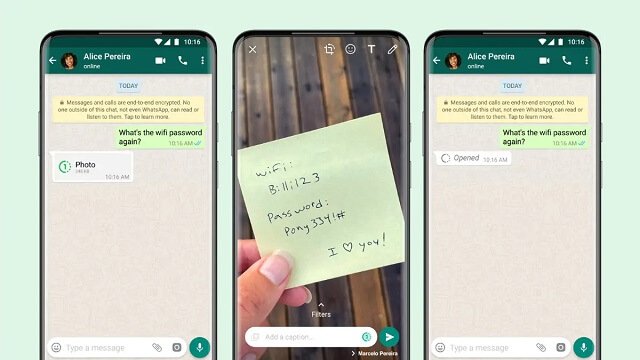
WhatsApp introduced the "View Once" feature specifically to enhance privacy. When you send a photo or video using this mode, the recipient can only view it once, after which it disappears. The critical point here is that WhatsApp actively attempts to prevent screenshots of "View Once" media.
However, understand the limits:
- The Block Isn't Foolproof: While WhatsApp prevents the screenshot function within the app, the recipient can always use another device (e.g., a second phone or camera) to take a picture of the screen. This is a low-tech but effective workaround.
- Notification Remains Absent: Even if the screenshot block fails (due to a workaround), WhatsApp still won't notify you that an attempt was made.
Consider "View Once" as a deterrent—an extra layer of privacy—but not an impenetrable shield.
Leveraging WhatsApp Privacy Settings to Minimize Screenshot Risks
Since WhatsApp doesn't offer comprehensive screenshot notifications, your best defense is to proactively manage your privacy settings. Here's what you can control:
- Last Seen & Online: Choose who can see when you were last online or if you're currently online. Options are "Everyone," "My Contacts," "My Contacts Except…", or "Nobody." Limiting this reduces the chance of someone constantly monitoring your activity and taking screenshots for context.
- Profile Photo: Decide who can see your profile picture. The same options apply: "Everyone," "My Contacts," "My Contacts Except…", or "Nobody."
- About: Control who can view your "About" section (your status message). Again, the same privacy options are available.
- Status: Configure who can see your status updates. You can share with "My Contacts," "My Contacts Except…", or "Only Share With…".
- Groups: Manage who can add you to groups by selecting "Everyone," "My Contacts," or "My Contacts Except…". Unwanted group additions can lead to unwanted exposure and potential screenshots.
- Disappearing Messages: Set a default timer for new chats to disappear after 24 hours, 7 days, or 90 days. This applies to all new chats initiated after you enable it.
Practical Tip: Regularly review and adjust these settings based on your comfort level and evolving privacy needs.
Screenshot Notifications in Other Apps: A Quick Comparison
WhatsApp's approach to screenshot notifications differs from some other popular messaging apps. Here's a brief look:
| App | Screenshot Notification Behavior | Scope |
|---|---|---|
| Snapchat | Always notifies the sender when a screenshot is taken. | Snaps, Chats, and Stories |
| Instagram/Messenger (Vanish Mode) | Notifies when a screenshot is taken. | Only in "Vanish Mode" for disappearing photos and videos. |
| Telegram | Notifies iPhone users in "Secret Chat." Android version doesn't notify. | Only in "Secret Chat" mode; doesn't apply to regular chats on Android. |
| Generally does not notify, except for attempting to block "View Once" screenshots. | No notification for chats, status, or profile; block attempt for View Once. | |
| This comparison highlights that WhatsApp prioritizes a less intrusive approach compared to apps like Snapchat, which are built around ephemeral content and screenshot detection. However, apps like Instagram and Messenger leverage screenshot detection only in ephemeral modes like "Vanish Mode." | ||
| For a broader understanding of WhatsApp's privacy policies, Here's what you need to know. |
Spotting and Avoiding Screenshot Notification Scams
Be wary of apps or services claiming to offer screenshot notifications for WhatsApp or "private screenshots." These are often scams designed to steal your data or install malware.
Red Flags:
- Demands for Excessive Permissions: The app requests access to your contacts, messages, or other sensitive information that isn't directly related to screenshot detection.
- Unrealistic Claims: Promises to notify you every time someone screenshots anything on WhatsApp are highly suspect.
- Poor Reviews and Ratings: Check app store reviews for complaints about functionality, privacy, or security.
- Unofficial Sources: The app isn't available on reputable app stores (Google Play Store or Apple App Store).
Best Practices: - Stick to Official Apps: Only download apps from trusted sources like the official app stores.
- Read Permissions Carefully: Before installing any app, carefully review the permissions it requests.
- Use Antivirus Software: Install and regularly update antivirus software on your device.
- Report Suspicious Apps: If you encounter a suspicious app, report it to the app store provider.
Quick Answers: Screenshot FAQs
Q: If I use a third-party WhatsApp mod, will I get screenshot notifications?
A: Using unofficial WhatsApp mods is risky. They may claim to offer screenshot notifications, but they often come with security vulnerabilities and privacy risks. It’s best to stick to the official WhatsApp app.
Q: Can someone tell if I screenshot their "View Once" photo if I use a screen recording app instead?
A: No. WhatsApp's screenshot block is targeted at the native screenshot function. If you use a separate screen recorder, WhatsApp will not detect it. However, recording someone’s "View Once" content without their consent is a breach of trust.
Q: Is there a way to protect my profile picture from being screenshotted on the desktop version of WhatsApp?
A: Unfortunately, WhatsApp doesn't offer a built-in way to prevent screenshots of profile pictures on the desktop version. The best you can do is limit who can view your profile picture in the privacy settings.
Q: If I block someone on WhatsApp, will they still have the screenshots they took before I blocked them?
A: Yes. Blocking someone prevents future communication, but it doesn't retroactively delete any screenshots they may have already taken.
Your Playbook: Managing Screenshot Risks on WhatsApp
Here's a simple decision tree that can help you navigate:
- Are you sending sensitive information?
- Yes: Use "View Once" for photos/videos, enable disappearing messages, and carefully consider who you're sharing with.
- No: Proceed with caution, but understand that screenshots are possible.
- Are you concerned about your profile information being screenshotted?
- Yes: Adjust your privacy settings to limit who can see your profile picture, "About" section, and status.
- No: No action needed.
- Do you need screenshot notifications?
- Yes: Consider using a different messaging app like Snapchat or Instagram (Vanish Mode) that offers this feature.
- No: WhatsApp is suitable for your needs.
Key Takeaways: - WhatsApp's lack of widespread screenshot notifications places the onus on users to manage their privacy proactively.
- "View Once" offers a limited but valuable layer of screenshot protection.
- Beware of scam apps promising unrealistic screenshot detection capabilities.
Ultimately, responsible communication and a thorough understanding of WhatsApp's privacy settings are your best defenses against unwanted screenshots.
