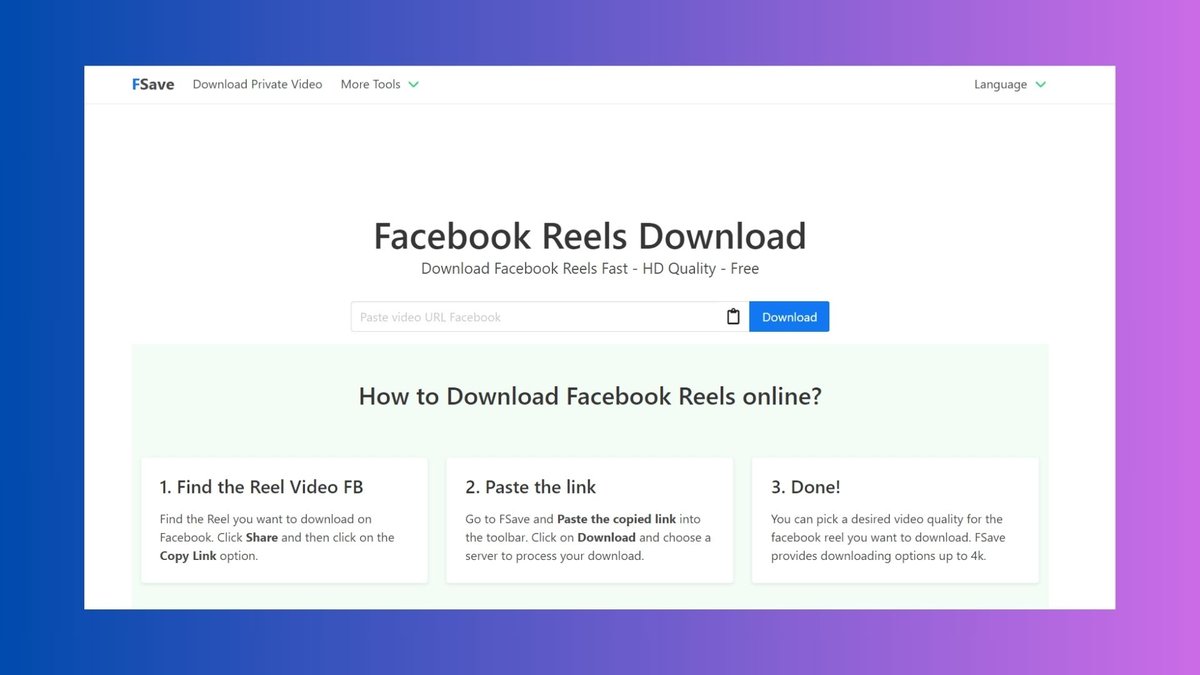
Ever scrolled through Facebook Reels and wished you could save a hilarious or insightful video for later viewing or reuse in your own content? Finding the right Facebook reel downloader can feel like navigating a minefield of dodgy sites and questionable software. The good news is that safe and effective options do exist.
At a glance:
- Discover safe methods to download Facebook Reels, avoiding risky websites and potential security threats.
- Learn how to download both public and private Reels, understanding the different techniques involved.
- Understand the legal and ethical considerations around downloading copyrighted material.
- Explore alternative tools like AI STUDIOS and SnapVid for enhanced download and editing capabilities.
- Master tips for maintaining video quality and avoiding watermarks during the download process.
Why You Need a Reliable Facebook Reel Downloader
Facebook Reels are designed for quick consumption within the Facebook ecosystem. Facebook does not provide a button for Facebook Reels downloads, especially on the desktop version. This limitation creates a need for a reliable Facebook reel downloader that allows you to:
- Watch offline: Enjoy Reels on the go without using data.
- Archive content: Save valuable or inspiring Reels for future reference.
- Reuse elements: Incorporate snippets into your own creative projects (with proper attribution, of course).
However, venturing into the world of third-party downloaders requires caution. Many sites are riddled with ads, malware, or simply don't work as advertised.
Understanding the Risks: Dodgy Downloaders to Avoid
Before we jump into the "how," let's cover the "what not to do." The internet is full of Facebook reel downloaders, but not all are created equal—or with good intentions. Some common risks include:
- Malware and viruses: Some downloaders sneak malicious software onto your device.
- Phishing scams: Fake login pages steal your Facebook credentials.
- Aggressive advertising: Pop-ups and redirects disrupt the download process and can expose you to further threats.
- Low-quality downloads: The downloaded Reel is pixelated, watermarked, or doesn't play correctly.
Red Flags: - The site asks for your Facebook login. Never enter your credentials on a third-party site. Legitimate services do not require this.
- Your browser displays security warnings before you even visit the site.
- The download process involves completing surveys or installing browser extensions.
Safe Methods for Downloading Public Facebook Reels
Here's a breakdown of trusted methods for downloading publicly available Facebook Reels:
1. Online Downloaders (FDOWN.net as an Example):
These websites let you paste the Reel link and download the video directly.
- Pros: Convenient, no software installation required.
- Cons: Can be ad-supported. Some Reels may not be downloadable due to Facebook's restrictions.
How to use FDOWN.net (or a similar service):
- Find the Reel you want to download on Facebook.
- Copy the Reel's link from your browser's address bar or by clicking the three dots and selecting "Copy Link."
- Go to FDOWN.net (or your preferred online downloader) and paste the link into the provided field.
- Click "Download."
- Choose your desired download quality (if available) and save the file.
2. Browser Extensions:
Some browser extensions claim to facilitate Reel downloads. However, exercise extreme caution here. The risk of malicious extensions far outweighs the convenience. Only install extensions from reputable sources and check their reviews carefully.
Important Considerations:
- Ad Support: Most free online Facebook reel downloader tools rely on ads to stay afloat. Expect some ads, but avoid sites with overly intrusive or misleading advertisements.
- Download Limitations: Facebook is constantly updating its platform, so some downloaders might not work consistently.
Downloading Private Facebook Reels and Videos
Downloading reels from private accounts or videos shared with limited audiences requires a different approach since these videos are not publicly accessible. This method works exclusively on computers and involves accessing the page source code and using a specialized online downloader. FDownload.app is a good option.
Steps:
- Go to Facebook on your desktop browser.
- Find the private reel or video you want and click on the time or date the video was posted to open it in a separate page.
- Next, view the page source code by pressing Ctrl + U on Windows or ⌘ + Option + U on Mac. Alternatively, right-click anywhere on the page and choose View page source.
- Select all the source code by pressing Ctrl + A (Windows) or ⌘ + A (Mac) and copy it.
- Then, open FDownload.app and paste the copied source code into the input box.
- Click Download.
- Choose your desired format, typically MP4 for video, and click download or render repeatedly until the file loads completely.
This requires some technical steps but is currently the most reliable solution for private Facebook content download.
Tools That Do More: AI-Powered Downloading and Editing
Some platforms, like AI STUDIOS, offer integrated Facebook Reel downloader functionality alongside other creative tools.
AI STUDIOS:
- Benefit: Combines downloading with video editing capabilities, including AI avatars, subtitles, and multilingual dubbing.
- Download Quality: Offers up to 1080p downloads on the free plan and up to 4K on paid plans.
- Safety: Operates entirely within your browser, minimizing the risk of malware or intrusive ads.
How to download with AI STUDIOS:
- Copy the link of the Reel you want to download.
- Paste the link into the Facebook Reel Downloader within AI STUDIOS.
- Choose your preferred quality (1080p free, up to 4K paid).
- Click "Download."
After saving a Reel, you can edit it in AI STUDIOS with options like subtitles, translation into over 150 languages, dubbing, or adding AI avatars.
Facebook Reel Downloader: Mobile App Options
For mobile users, downloading reels directly from your Android or iPhone is straightforward:
- Open the Facebook app.
- Tap on the menu icon (three horizontal lines).
- Tap your profile picture to go to your profile page.
- In the Reels section, play the reel you want to save.
- Tap the menu icon (three dots) in the bottom right corner.
- Choose the option to download the reel.
This saves the reel directly to your camera roll or gallery.
SnapVid - Another Option for Multiple Platforms
SnapVid is a free app that helps you to download videos from TikTok, Instagram, Facebook and Twitter easily.
Steps:
- Open the SnapVid app.
- On the Facebook app, select the icon (...) → Copy link the video you want to download.
- Paste the copied Facebook video link into the input box in SnapVid.
- Click the Download button.
- Select MP4 or MP3 format, keep pressing the Download or Render button and wait a few seconds for the file to load about your device.
Legal and Ethical Considerations
Before you start downloading every Reel in sight, it's crucial to understand the legal and ethical implications.
- Copyright: Downloading copyrighted material without permission is illegal. Most Reels contain music, video clips, or other elements protected by copyright law.
- Fair Use: Briefly using a small portion of a Reel for commentary, criticism, or educational purposes might fall under "fair use," but this is a complex legal doctrine.
- Privacy: Respect the privacy of the content creator and individuals featured in the Reel. Downloading and sharing private Reels without consent is a serious breach of privacy.
Best Practice: - Only download Reels you created yourself or have explicit permission to download.
- Give proper credit to the original creator if you reuse content.
- Avoid downloading Reels for commercial purposes without obtaining the necessary licenses.
Maintaining Video Quality: Tips and Tricks
Nobody wants a pixelated, blurry Reel. Here's how to maximize video quality when downloading:
- Choose the highest available resolution: If the downloader offers multiple quality options (e.g., 720p, 1080p, 4K), select the highest one your device and internet connection can handle.
- Avoid re-encoding: Some downloaders re-encode the video, which can degrade quality. Look for options that download the original file without modification.
- Check the file size: Larger file sizes generally indicate higher quality.
- Use a reputable downloader: As mentioned earlier, some shady downloaders intentionally reduce video quality to save bandwidth or add watermarks.
Common Questions About Facebook Reel Downloaders
Q: Is it legal to download Facebook Reels?
A: It depends. Downloading your own Reels or public Reels with the creator's permission is generally fine. Downloading copyrighted material without permission is illegal.
Q: Can I download Reels from private accounts?
A: Yes, using methods like viewing page source and using a specialized online downloader like FDownload.app, but consider the ethical implications and privacy concerns.
Q: Are Facebook Reel downloaders safe to use?
A: Some are, some aren't. Stick to reputable online downloaders like FDOWN.net or comprehensive tools like AI STUDIOS. Avoid sites that ask for your login credentials or trigger security warnings.
Q: Will downloading Reels slow down my computer?
A: Downloading itself won't significantly slow down your computer. However, downloading large files or using a downloader that consumes excessive resources might impact performance temporarily.
Q: Can I download Facebook Reels on my phone?
A: Yes, you can download via the Facebook app. Open the reel, tap the menu (three dots), and select download to save it directly to your camera roll.
Actionable Takeaways
- Decision Tree:
- Public Reel: Use a reputable online downloader like FDOWN.net.
- Private Reel: Use FDownload.app and the "view source" method.
- Need to edit the Reel? Consider AI STUDIOS for integrated downloading and editing.
- Quick Start Guide:
- Identify the Reel you want to download.
- Copy its link.
- Choose a safe download method based on the Reel's privacy settings and your editing needs.
- Download the Reel in the highest quality available.
- Respect copyright and privacy when reusing the content.
Downloading Facebook Reels can be a convenient way to enjoy content offline or repurpose it for your own creative projects. Just remember to prioritize safety, respect copyright, and choose the right tool for the job. For a broader perspective, you might find this resource helpful: Download FB Reels on PC.
